How to write prompts for GPT Image 2.6 Sunburst
GPT Image 2.6 Sunburst makes pictures from a sentence and edits the pictures you give it. The first two sections put OpenAI’s own prompting guide in our words, and we did not test them. The last rests on one sample picture, a magazine cover made with this model, that we looked at ourselves, so it is a very small sample.
Written from the provider’s documentation and from results we checked ourselves. Last checked November 8, 2026.
Make something with GPT Image 2.6 SunburstThe GPT Image 2.6 Sunburst model page
Where OpenAI places Sunburst, and exact text
From the provider’s documentation
- OpenAI calls GPT Image 2.6 Sunburst the base model, for work that needs more detail or precise edits, and says to start with it when the picture must meet demanding requirements for detail, layout or edit accuracy. GPT Image 2.6 Flare is the smaller model, for speed.
- For text in the picture, put the required wording in quotes and describe where it goes and in what lettering. Spell an unusual word or a brand name letter by letter if needed.
- Ask for no extra text, then check the spelling and the legibility. Say how many times a line should appear, for example a tagline exactly once. For slides, charts and diagrams, write the real labels and numbers in the prompt and check them afterwards.
- OpenAI says the quality setting controls how much detail the model can render, such as small lettering. Pickshot fixes the quality of each model, so look closely at small text in the result.
Edits and several pictures
From the provider’s documentation
- For an edit, say change only the one thing and list what must stay: who is in the picture, the layout, the light, the labels. Name exclusions such as unwanted text, logos or watermarks.
- With several pictures, number each one and give it a role, such as subject, style, clothing or background. Say how they combine.
- Change one thing at a time, pass the last result back in and repeat the details to keep. OpenAI warns that repeated edits can drift, and that if an area must stay pixel for pixel the same, the approved edit should be placed onto the original outside the model.
- OpenAI lists checks to make: text and diagram labels, product shape and label legibility, identity in edits, and consistency across repeated requests.
What our one sample picture showed
From results we checked ourselves
- The sample is a magazine cover for a fictional coffee journal. The prompt put “SLOW ROAST” in quotes and asked for clean typography, a ceramic dripper on a linen table and morning light. “SLOW ROAST” is spelled as written, in large serif capitals under a small masthead, and the dripper, the linen and the soft side light are there.
- The prompt said nothing about other words, and the model added many: “THE COFFEE JOURNAL” as a masthead, “VOL. 07 NO. 02” and “SPRING 2025” in the corners, a headline reading “The Beauty of Brew Time” with a line under it, and three cover lines with small subtitles. All of it is spelled correctly as far as we can read. OpenAI’s advice to ask for no extra text applies: if you want only the title, say so.
- One picture is a very small sample, so we say nothing about how often the spelling holds, about other languages or about edits.
Real results and the prompts behind them
Results made with this model. The prompts are shown exactly as written, in English.
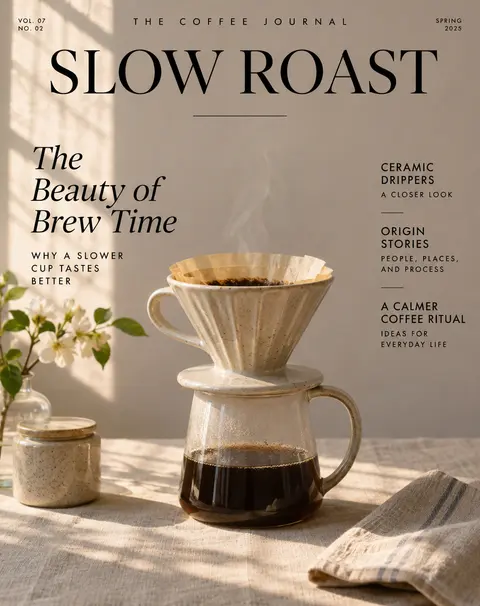
A magazine cover for a fictional coffee journal titled "SLOW ROAST" with clean typography, a ceramic dripper on a linen table, morning light
Settings of this model
- થી
- OpenAI
- પ્રકાર
- AI image model
- કેવી રીતે બનાવવું
- લખાણમાંથી છબી · છબી સંપાદન
- રિઝોલ્યુશન
- 1K / 2K
- કિંમત
- from 24 / image
પ્રશ્નો
Does GPT Image 2.6 Sunburst spell the text I put in quotes?
In our one sample the quoted title was spelled as written, and so were the extra lines the model added. OpenAI says text can still be imperfect, so check every picture.
How do I stop it adding text I did not ask for?
OpenAI says to ask for no extra text and to say how often a line should appear. In our sample the model added many lines when the prompt did not say. We did not test how well an instruction against them works.
How should I write an edit request?
Say what to change and list what must stay, one change at a time, as OpenAI’s guide advises. We have no edit sample of our own for this model, so look at the whole picture after each edit.
Provider documentation we read
We read these pages and wrote the points that matter in our own words. The provider may change them.
- Image prompting guide (OpenAI) (developers.openai.com)
- Image generation guide (OpenAI) (developers.openai.com)
More prompting guides
- How to write prompts for GPT Image 2.6 FlareAI image model
- How to write prompts for Nano Banana 2.1AI image model
- How to write prompts for MOSS ImageAI image model
- How to write prompts for Grok Imagine ProAI image model
- How to write prompts for Nano Banana ProAI image model
- How to write prompts for Nano Banana 2AI image model
- How to write prompts for GPT Image 2.5 FlareAI image model
- How to write prompts for IndigoAI image model
- How to write prompts for SaffronAI image model
- How to write prompts for CeladonAI image model
- How to write prompts for LapisAI image model
- How to write edit requests for UmberAI છબી સંપાદક
- How to write prompts for Kling Video 4.0AI video model
- How to write prompts for Seedance 2.5AI video model
- How to write prompts for Seedance 2.0 MiniAI video model
- How to write prompts for Kling V3AI video model
- How to write prompts for Kling O3 OmniAI video model
- How to write prompts for Veo 3.1AI video model
- How to write prompts for Veo 3.1 FastAI video model
- How to write prompts for SilkAI video model
- How to write prompts for LacquerAI video model
- How to write prompts for SatinAI video model
આ સાઇટ પરના મૉડેલ, કંપની અને ઉત્પાદનોના નામ તેમના માલિકોના ટ્રેડમાર્ક છે; Pickshot તેમની સાથે સંલગ્ન નથી, તેમના દ્વારા પ્રાયોજિત કે સમર્થિત નથી.