From an original character to pictures and video
Tagabuo ng Tauhan gamit ang AI
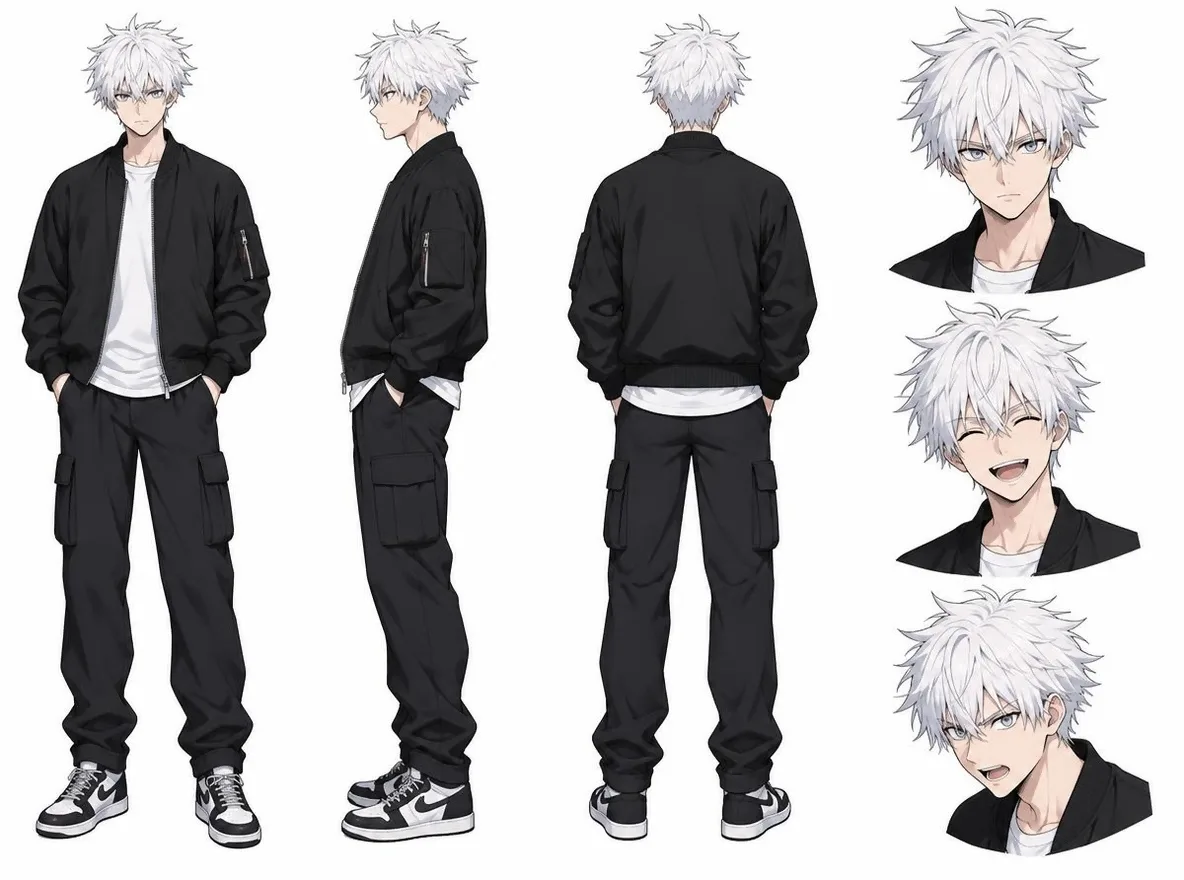
Open Characters, choose AI portrait, anime or mascot, and describe hair, clothes and colours to make a few options. Choose Keep this face, add a name and description, and save. You can also register one to three reference pictures of your original fictional character. Reference pictures help carry features into new scenes, but faces, hair, outfits and details can vary between results. Review every result before publishing.
Walang kailangang i-install. Walang kailangang credit card. Pribado bilang default.
What does it do?
- Choose a look and details
- Open Characters, choose AI portrait, anime or mascot, and describe hair, clothes and colours to make a few options.
- Save a face you like
- Free accounts can save three characters and three influencer profiles. Plus allows 10 of each, Pro 30 and Max 100.
- Where can I check prices and limits?
- Free accounts can make unlimited text-to-image pictures on the website with the five basic image models. Making a picture from a reference picture is an edit with its own price, shown before you start; a membership includes it when the edit runs on a Pickshot-series model.
- Will the face always be identical?
- Reference pictures help carry features into new scenes, but faces, hair, outfits and details can vary between results. Review every result before publishing.
- Account
- A free account is needed to make anything; signing up asks for no card.
- Mga wika
- Pages, studio and prompts in English, Korean, Japanese and Simplified Chinese
- Watermark
- No visible watermark; each file carries metadata that marks it as AI-generated.
Na-update
What does it do?
Open Characters, choose AI portrait, anime or mascot, and describe hair, clothes and colours to make a few options. Choose Keep this face, add a name and description, and save. You can also register one to three reference pictures of your original fictional character. A character stores reference pictures. An influencer is a separate profile with a name, bio, niche, platform and face picture. You can copy a face from a character; deleting one does not delete the other’s picture.
Keep creating with a saved face
Choose a look and details
Open Characters, choose AI portrait, anime or mascot, and describe hair, clothes and colours to make a few options.
Save a face you like
Choose Keep this face, add a name and description, and save. You can also register one to three reference pictures of your original fictional character.
Make pictures, video and posts
Choose Make a picture, Make a video or Create an AI influencer on your saved character. The influencer action copies a face picture into a separate profile for making post images.
Get started in three steps
Choose a look and details
Open Characters, choose AI portrait, anime or mascot, and describe hair, clothes and colours to make a few options.
Save a face you like
Choose Keep this face, add a name and description, and save. You can also register one to three reference pictures of your original fictional character.
Make pictures, video and posts
Choose Make a picture, Make a video or Create an AI influencer on your saved character. The influencer action copies a face picture into a separate profile for making post images.
Ways to use it
/01
Character scene drafts
Reuse a reference while changing the setting or pose, then compare the results.
/02
Virtual creator posts
Prepare cafe, travel and fashion post images for your niche and platform.
/03
A short video’s first frame
Pick one result you like and continue with a short video.
Bumili ng mga credit kung kailangan; mga credit ang ginagamit para sa membership
May 50 credits ang mga bagong account. Maaari ring gumawa ang mga libreng account ng walang limitasyong mga larawan sa website gamit ang 5 pangunahing modelo nang hindi gumagastos ng credits. Libre ang mga Lacquer video sa website: 3 bawat araw, hanggang 5 segundo bawat clip. Walang limitasyon o bawas na credits ang mga kasamang modelo para sa mga miyembro. Hiwalay ang singil sa ibang modelo at API/MCP.
Pickshot-series models without credits · 4 generations at a time · Unlimited free-model images (Higher priority than Free)
Pickshot-series models without credits · 8 generations at a time · Unlimited free-model images (Higher priority than Plus)
Pansamantalang ubos ang mga Booster Pass at membership. Patuloy na gagana ang mga credit at membership na mayroon ka na hanggang sa matapos ang mga ito.
Mga tanong
Will the face always be identical?
Reference pictures help carry features into new scenes, but faces, hair, outfits and details can vary between results. Review every result before publishing.
Are characters and influencers the same saved item?
A character stores reference pictures. An influencer is a separate profile with a name, bio, niche, platform and face picture. You can copy a face from a character; deleting one does not delete the other’s picture.
Can I make a video too?
Choose Make a video on a character or finished post image to use it as the first frame. Choose a model and length, then describe the movement. Keeping every detail unchanged is not guaranteed.
Where can I check prices and limits?
Free accounts can make unlimited text-to-image pictures on the website with the five basic image models. Making a picture from a reference picture is an edit with its own price, shown before you start; a membership includes it when the edit runs on a Pickshot-series model.
Magsimula sa iyong tauhan
Make options, pick a face, save it and keep its story going. Start with an original fictional adult character or mascot. Do not impersonate real people or reproduce minors.
Magsimulang lumikha nang libre