EDIT BY DESCRIBING · FREE TO START
AI Photo Editor: Inpaint, Relight and Enhance
Pickshot's AI photo editor lets you open a photo or a generated image, describe what you want changed, and have only that part redrawn. Inpainting, relighting, detail refinement, new angles, image enhancement and skin enhancement are all in one place. No layers or masks to learn; just say what you want.
No installation. No credit card. Private by default.
What is an AI photo editor?
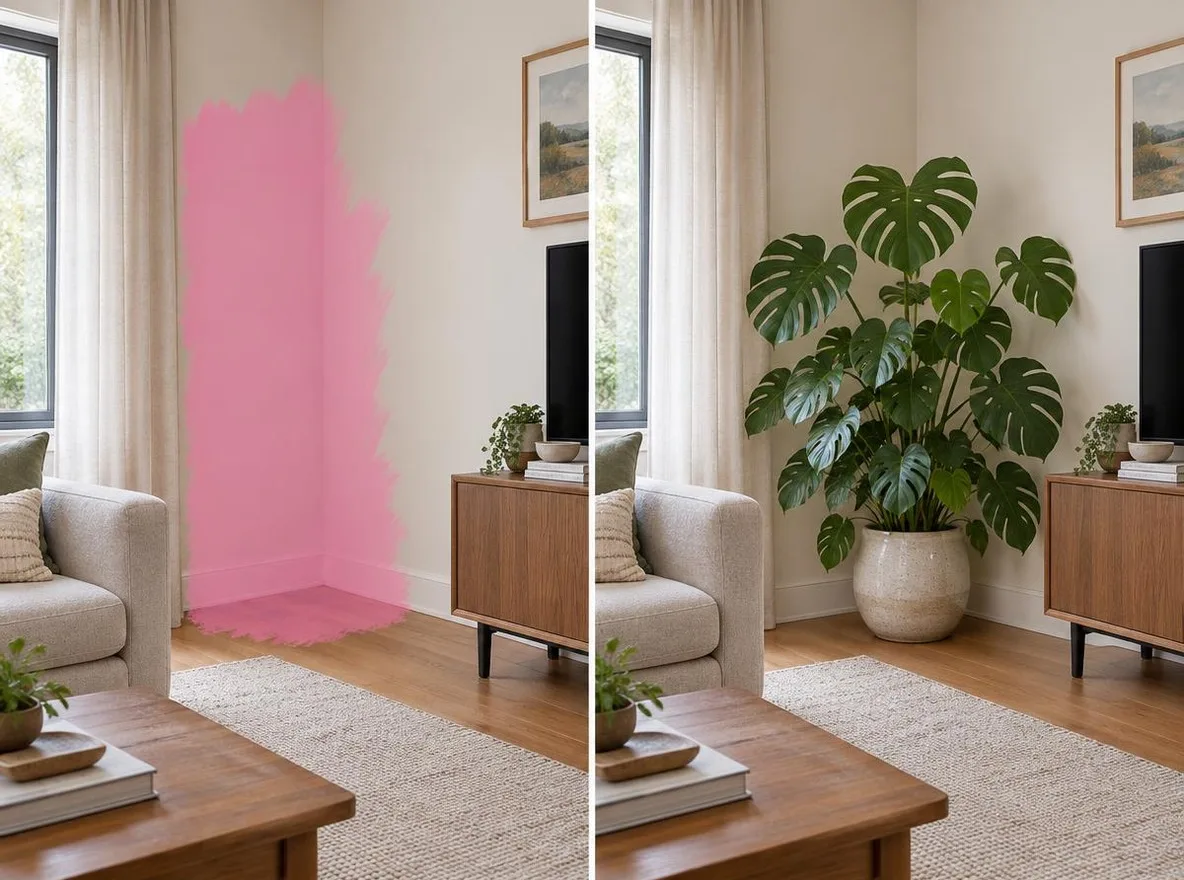
An AI photo editor is a tool that changes an image from a written instruction instead of manual pixel work. In Pickshot you can inpaint a selected area, relight a scene to change the direction and mood of the light, and refine awkward details, all by describing the result in English, Korean, Japanese or Chinese. Uploaded photos pass a safety check before they are processed.
Why edit photos with Pickshot
Inpaint one area
Paint over the area you want to change and write something like 'remove the hat' or 'add cherry blossoms to the background'. Everything else stays as it was.
Relight the scene
Turn midday light into golden hour or flat indoor light into a studio setup by adjusting the direction and color of the light.
Refine details and change angles
Clean up awkward hands, eyes or hair, and see the same subject from a different camera angle.
Enhance image and skin
Use the image enhancer to sharpen soft results and the skin enhancer for natural retouching that keeps real texture.
One-photo apps
With no prompt at all, restore and colorize old photos, make profile photos, try hairstyles or swap the travel backdrop. Photo apps need an account and cost 2 credits each.
Your language, private by default
Write instructions in your own language and Pickshot translates them. Edited images stay private until you choose to share them.
How to edit a photo with AI
Open a photo
Upload a photo or open an image you generated in Pickshot. Uploads go through a safety check.
Pick a tool and describe the change
Choose inpaint, relight, refine or another tool and write what should change. For a local edit, paint over the area first.
Compare and save
Compare the result with the original and save it if you like it, or adjust the instruction and try again.
How Pickshot differs from typical photo editors
Most photo editing apps and mainstream AI editors assume manual adjustment or English-only instructions.
Mainstream tools
- − You need to learn selections, masks and layers
- − AI features often work reliably only with English instructions
- − Generation, editing and retouching are spread across separate apps
- − Billed in US dollars only
Pickshot
- ✓ Describe edits in Korean, Japanese, Chinese or English
- ✓ Generate, inpaint, relight and enhance in one service
- ✓ Local-currency pricing plus free credits (50 on sign-up, 10 daily)
- ✓ Edits are private by default and uploads are safety-checked
Use cases
/01
Online store product photos
Remove clutter from product shots and tidy the lighting for listing pages, or place products on marble or pastel studio backdrops with the product scene app.
/02
Instagram profiles and feeds
Even out selfies with skin enhancement and relighting, then post at 4:5.
/03
Family photo restoration
Restore faded family photos, add color and share them with relatives.
/04
Finishing generated images
Fix awkward hands or backgrounds in AI illustrations with inpainting so they are ready for a blog post or storyboard.
Pay for what you use, in your currency
8 images/day without an account; 100/day plus 50 credits with a free account
1,500 credits every month
5,000 credits every month
Preview period: generation opens soon, and every screen and option is available to explore now.
Questions
Is it free?
Text-to-image works without an account for 8 images a day on free models, or 100 a day with a free account. Photo-upload apps require sign-in and cost 2 credits each; you get 50 credits on sign-up and 10 bonus credits daily.
What edits can I make?
Inpainting, relighting, detail refinement, angle changes, image enhancement and skin enhancement. Photo apps also cover old photo restoration and colorizing, profile photos, hairstyle try-ons and backdrop swaps.
Can I edit photos of other people?
Upload only photos of yourself or photos you have the right to use. Impersonating real people and sexual or violent edits are prohibited, and uploads are checked before processing.
Can I use an AI profile photo for a passport or ID?
AI ID-style photos are not guaranteed to be accepted for passports or official IDs. Always check the issuing authority's official requirements.
Are my edited photos public?
No. Nobody else can see them until you share them to the Explore feed yourself.
Does it work on mobile?
There is no app, but the mobile web version works with a bottom tab bar. Generation is currently in preview.
Start with one photo and one sentence
Sign up to get 50 credits right away and 10 more every day. Try it while Pickshot is in preview.
Start creating for free