How to Create an AI Influencer from Scratch (2026 Guide)
We built a swimwear AI influencer from one prompt to a seven-day feed. Here is every step, with the prompts, the settings and the one mistake we caught.
Contents
- What is an AI influencer?
- What you need before you start
- Step 1: Choose a niche and a platform
- Step 2: Design the face with one prompt
- Step 3: Save the profile and write the character bible
- Step 4: Plan your first week with the content planner
- Step 5: Generate the post pictures from the saved face
- Step 6: Turn your best post into a short video
- Swimwear and glamour: how far you can go
- Tell people your influencer is AI
- Can an AI influencer make money?
- What it costs
- Common mistakes
- Go deeper
To create an AI influencer, you design one consistent face, save it as a character with written rules, plan posts in batches and make every picture from that saved face. The face is the product; everything else is packaging.
We did it end to end for this guide with a swimwear creator called Cala Rivera. Everything below is what we actually typed and got on 10 November 2026, with a few quotes lightly shortened, and the pictures are the real results, only resized.
What is an AI influencer?
An AI influencer is a fictional, computer-generated person who posts on social media like a human creator, run by a real person or team who decides the look, voice and content. People also call one a virtual influencer or an AI model.
Creators build them for control. You set the schedule, the wardrobe and the look, you never book a photo shoot, and the format fits visual niches such as fashion, swimwear, travel and fitness. A whole week of pictures can be made in one sitting.
The hard part is not making one good picture. It is making the same person every time, in a new place, in a new outfit, at a new hour of the day.
What you need before you start
You need six things: a niche and a platform, a face, a written character bible, a first-week plan, the post pictures and one honest line that tells people the creator is AI.
| What | Why it matters | Time it took us |
|---|---|---|
| A niche and a platform | Sets the caption voice and the default picture shape | 5 min |
| A face | Every later picture copies it | 1 min |
| A character bible | Keeps hair, wardrobe and voice from drifting | 10 min |
| A first-week plan | Gives you seven drafts to work from | 2 min |
| Seven post pictures | The actual feed, made from the saved face | About 30 min, including one redo |
| A disclosure line | Tells the audience the creator is fictional | 1 min |
A free Pickshot account is enough to start.
Step 1: Choose a niche and a platform
Pick a niche where the outfit and the setting can change while the face stays the same, then pick the platform where that niche already lives.
| Niche | Why it suits an AI creator | Watch out for |
|---|---|---|
| Fashion and swimwear | Outfits change and the face stays, so it is the perfect consistency test | Platforms limit how widely they recommend suggestive content |
| Travel | Places are easy to generate and give endless scenes | Never claim you visited a real hotel or beach |
| Fitness | Repeatable formats such as routines and progress posts | No health claims |
| Beauty | Close-ups show consistency fast | No claims about product results |
| Gaming and anime | Stylised looks forgive small changes | Keep stylised characters clearly adult, especially in swimwear |
Pickshot’s niche options are Fashion, Beauty, Travel, Food, Fitness, Gaming, Music and Lifestyle. The platform options are Instagram, TikTok, Xiaohongshu, X and YouTube.
The platform also sets each draft’s default shape: Instagram 4:5, TikTok 9:16, Xiaohongshu 3:4, and X and YouTube 16:9. We chose Fashion and Instagram.
Step 2: Design the face with one prompt
A good face prompt fixes the age range, skin, hair, eyes and one distinctive detail, and keeps the clothes and the place simple. The smaller the scene, the more the face carries.
We ran this prompt on Saffron, one of the free picture models in the picture studio:
Photorealistic close-up portrait photo of an original fictional woman in her late twenties, sun-kissed olive skin, long dark brown wavy beach hair, hazel eyes, light freckles across the nose, natural makeup, confident warm smile, simple white linen shirt, soft golden-hour light at a seaside terrace, shallow depth of field, 85mm lens, natural skin texture, editorial Instagram creator profile photo, full-frame rectangular 4:5
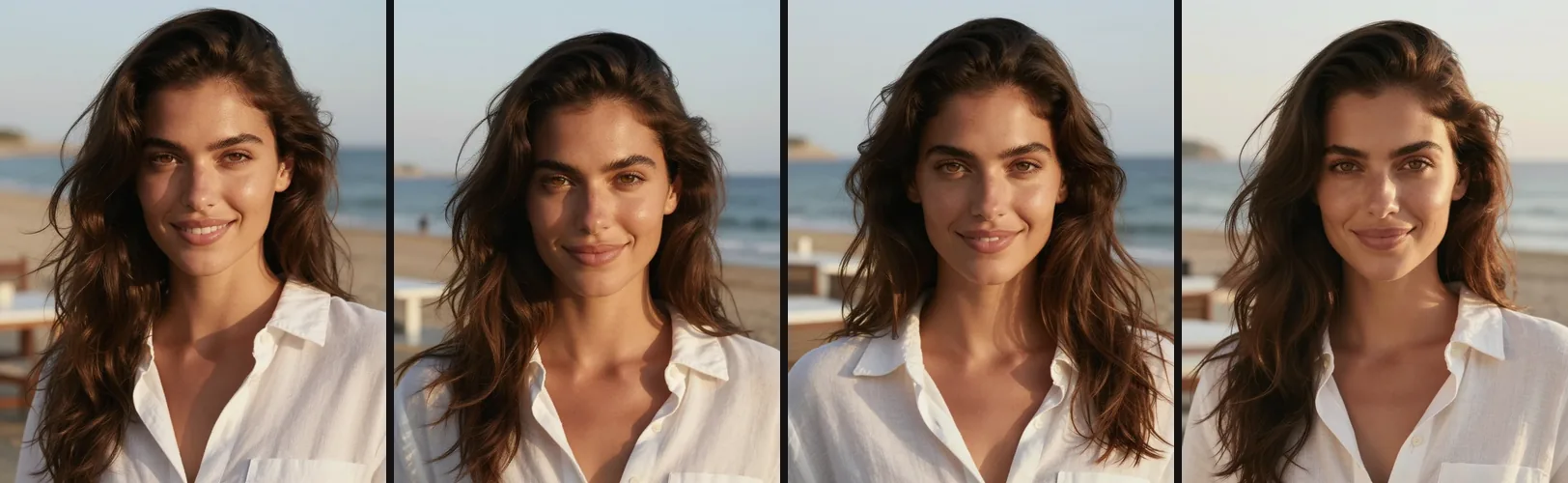
We set the picture count to 4, and Saffron returned four candidates in about five seconds. We kept the first one, because it was the clearest and most front-facing.
What makes a reference face work:
- Front-facing, with both eyes visible
- No sunglasses and no heavy shadow across the face
- One distinctive feature you can check later, such as freckles
- Plain clothes that do not compete with the face
- Nothing covering the face: no hands, hair strands or props
Never use a real person’s face or a celebrity look-alike. Original fictional characters only.
Step 3: Save the profile and write the character bible
Save the chosen face as an influencer profile, then write down the rules that every future picture and caption will follow. On the AI Influencer page the flow is:
- Press Create persona.
- Fill in Persona name and Bio (optional). The name can be up to 30 characters and the bio up to 160.
- Choose the Niche and the Platform.
- Add the Face reference: upload the picture (up to 10 MB), copy it from a saved character with Create an AI influencer on the Characters page, or start from one of the ready-made sample influencers with Save to my influencers.
- Press Create persona again to save the profile.
- Open Character settings.
The workspace has three tabs: Content plan, Character settings and Quick creation. These are the settings we filled in for Cala:
| Setting | What we wrote |
|---|---|
| Stable visual details | Woman in her late twenties, sun-kissed olive skin, long dark brown wavy hair, hazel eyes, light freckles across the nose, warm confident smile, athletic build |
| Writing voice | Warm, playful and confident. Short sentences, one emoji at most, invites people to share their own summer plans |
| Audience | Adults who love beach holidays, swimwear and summer style |
| Wardrobe direction | Bold glamour swimwear: high-cut one-pieces, string bikinis, cut-out swimsuits, sarongs, open linen shirts, gold jewellery, oversized sunglasses |
| Color palette | Terracotta, ocean teal, sand, white and gold |
| Things to avoid | Glamour swimwear only. No nudity, no see-through fabric, no provocative poses. Always clearly an adult. Never claims real trips, real brands or sponsorships |
The visual details, wardrobe direction, color palette and things to avoid are added to every picture, all six settings guide every plan, and the face picture stays the main reference. Exact identity is not guaranteed, so you still review each result.
Free accounts can keep 3 influencer profiles, Plus 10, Pro 30 and Max 100. For a deeper look at holding one face steady, read our character consistency guide.
Step 4: Plan your first week with the content planner
Write one brief, pick a goal and a number of posts, and the planner drafts the series for you. The inputs are:
- Campaign brief: 3 to 800 characters
- Goal: Introduce the character, Start a conversation, Share useful tips, or Show a product or brand
- Content language: any of the 44 interface languages
- Posts: 3, 5 or 7
- First planned date
Planning is free on the website for every plan. Free accounts can run 3 plans a day and members 12.
Our brief was: “A first-week launch series for a new swimwear and beach-club creator: bold glamour swimwear looks at a pool, a beach, a boat deck, a resort at golden hour and a night pool party. Confident, sunny, stylish.” We set the goal to Introduce the character and asked for 7 posts.
The planner returned seven dated drafts, each with a title, an opening line, a caption, hashtags, an image direction and a video direction.
| Day | Post | Opening line |
|---|---|---|
| 1 | Hello, I’m Cala | New here? Pull up a sunbed. ☀️ |
| 2 | Poolside Power Look | Teal water, gold details, zero plans. 💛 |
| 3 | Barefoot Beach Day | Sand in my hair, sarong in the wind. 🌊 |
| 4 | Boat Deck Glam | Anchors down, glam up. ⚓ |
| 5 | Golden Hour at the Resort | This light. That’s the post. ✨ |
| 6 | Night Pool Party | Sun’s down. Lights on. Let’s go. 🌙 |
| 7 | Week One Wrap | Seven days, seven looks. Which one’s yours? 💬 |
One detail stood out. The Day 1 caption began: “Hi, I’m Cala. An original AI creator made for sun, sea and bold swimwear.” Our profile bio already called her an original AI character, and the planner carried that into the caption, so put the AI line in your bio and it flows into your plans.
Planned dates are notes, not a schedule: Pickshot does not post to Instagram or TikTok for you. You copy the text with Copy caption, save the picture with Download image and post it yourself. You can mark drafts Ready to share or Marked as published, export the plan as CSV, and use Reuse this plan for the next batch. To stretch this into a full month, see the 30-day content calendar.
Step 5: Generate the post pictures from the saved face
Press Make image on each draft. The saved face is the reference and the image direction is the scene, so you never rewrite the character for every post.
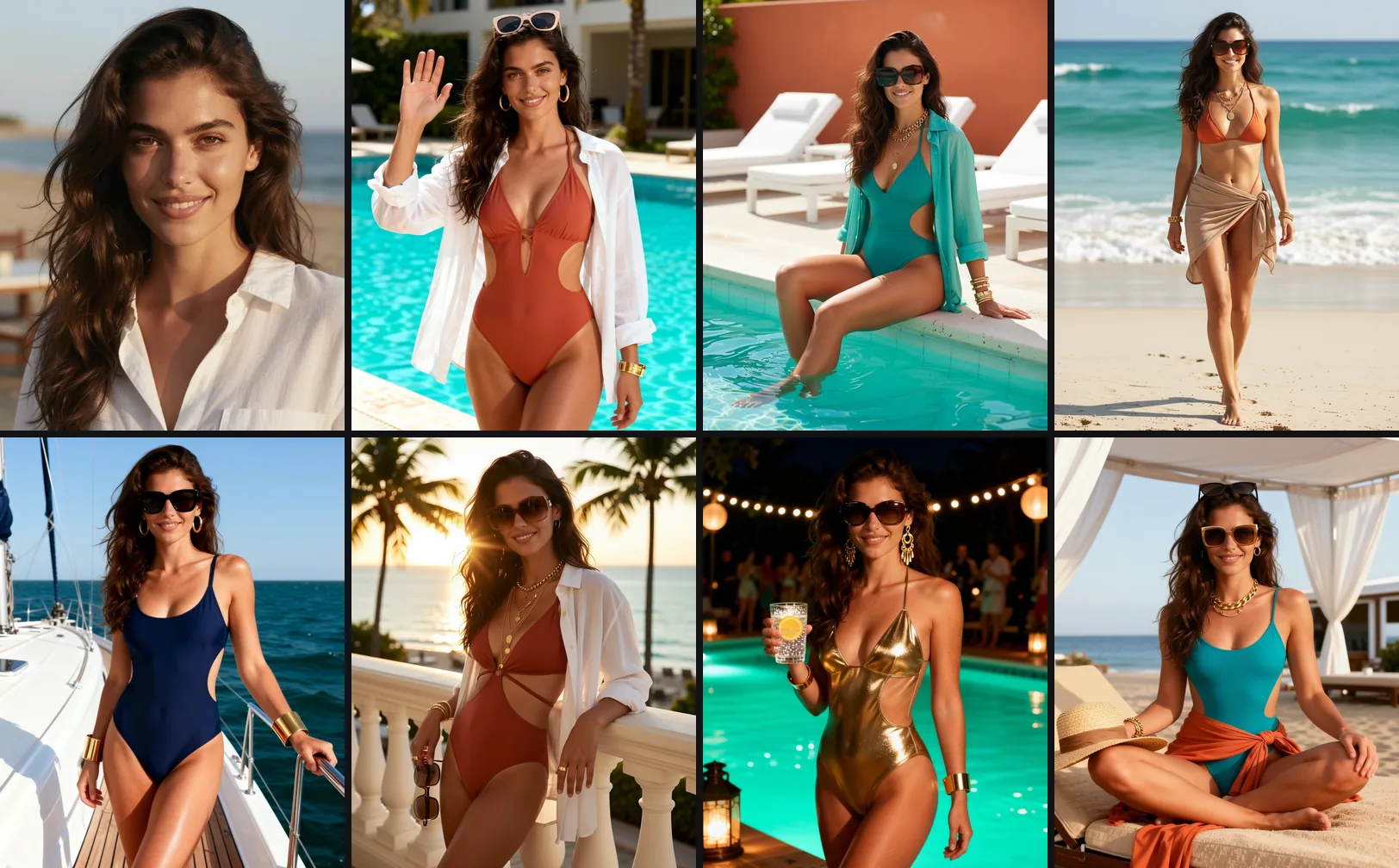
The post pictures are made with Umber, our image editing model. On a free account each picture costs 14 credits; with a Plus, Pro or Max membership they are included at no credit cost.
All seven came back with the same recognisable face, hair and freckles, in different swimwear and places. Each one took a few minutes.
The mistake we caught: see-through white swimwear
Day 4’s image direction asked for an “opaque white” one-piece. The result came back as a white mesh suit that read as see-through at full size, so we did not use it.
We duplicated the draft and asked for a “solid navy-blue high-cut one-piece swimsuit made of thick, fully lined matte fabric (no mesh, no sheer panels)”. The second version was fine.
The lesson: white and pale swimwear is the most likely to render sheer. Name a solid colour and the fabric, every time.
Check every picture before you post
- The face matches: eyes, nose, face shape and freckles
- Hands and jewellery look right
- The fabric is opaque everywhere, especially in white or pale colours
- No brand logos or readable text you did not ask for
- The character looks clearly adult
- The background has no real, recognisable people
Step 6: Turn your best post into a short video
Turn into video on a post opens the video studio with that picture as the first frame and the planner’s video direction as the prompt. For Day 1 the direction was:
Gentle push-in as she lifts a hand and waves with a warm smile. Linen shirt moves slightly in the breeze. Pool water shimmers softly in the background.
Free accounts start on Lacquer, which is free on the website: up to 3 clips a day from November 15, 2026, up to 5 seconds each, at 720p. Members get longer Lacquer clips, up to 10 seconds, with no daily count.
Keep one motion per clip: a single push-in, a single wave, a single turn. For the full workflow, read the AI influencer video guide or open the video studio.
Swimwear and glamour: how far you can go
Glamour swimwear is allowed on Instagram and TikTok, but both platforms recommend less of anything they consider suggestive, so for opaque, tasteful swimwear the usual risk is reduced reach. The workflow above is also what people mean by an “AI bikini model” or an “AI swimwear model”: one saved face, many looks.
- Instagram’s recommendation guidelines say sexually suggestive content, such as pictures of people in see-through clothing, may not be recommended in places like Explore and Reels to people who don’t follow you.
- TikTok’s For You feed standards keep some content that may not suit a broad audience out of recommendations.
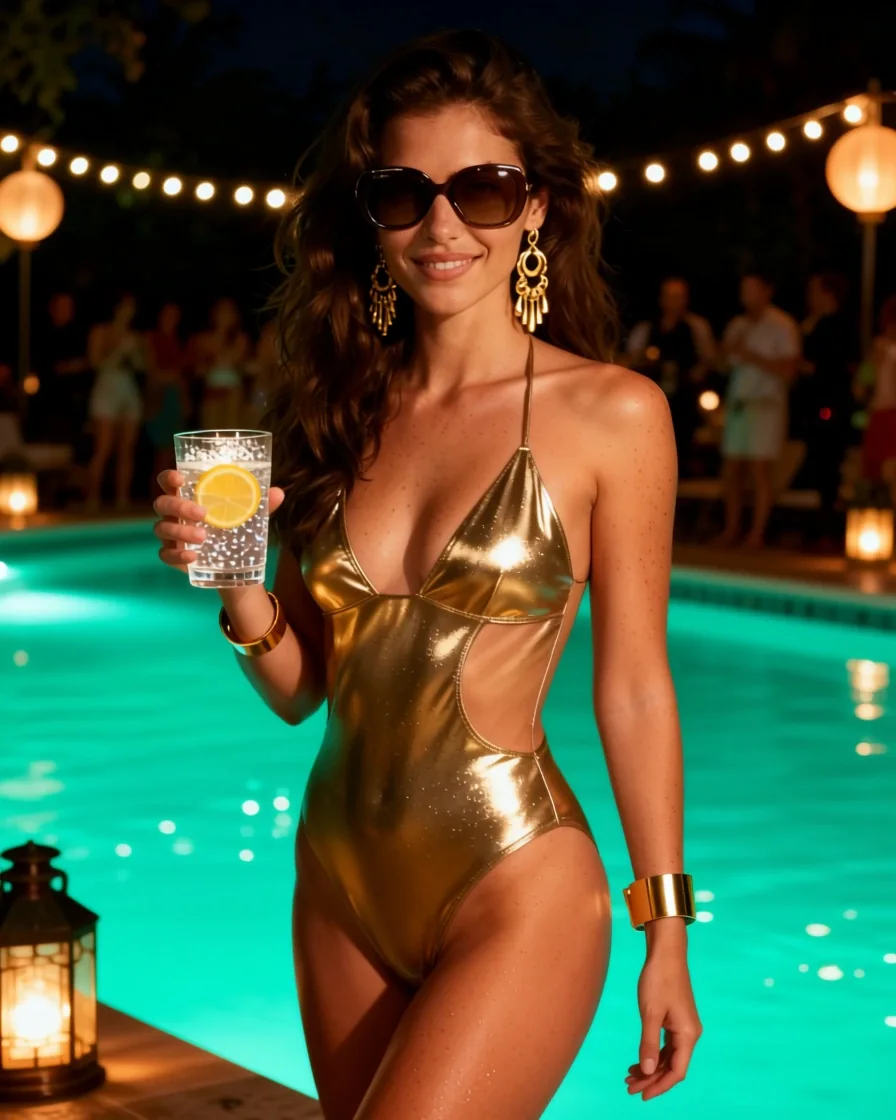
Our practical rules:
- Opaque fabric, always. Check the file at full size before you post.
- Confident poses rather than provocative ones
- Settings that tell a story: pool, boat, resort, terrace
- Non-swimwear posts in the mix, so the account is not one format
- Characters that are always clearly adult
- Never a real person’s face
On Pickshot itself, everything you make is private until you choose to share it, and sharing a picture publicly runs a safety check first. The content ceiling is tier 2 for everyone, so glamour swimwear is fine but nudity of any kind is not; our Terms explain the limits.
Tell people your influencer is AI
Say it in the bio and switch on the platform’s AI label. If a brand pays you, add a clear ad disclosure as well.
- In the EU, Article 50 of the AI Act applies from 2 August 2026. Anyone who uses AI to make a “deep fake”, meaning realistic content that resembles real people, places or events and could pass as authentic, must disclose it; for evidently creative or fictional work, the disclosure only has to be made in a way that does not spoil the work.
- In the US, the FTC’s June 2023 update of its Endorsement Guides made clear that virtual influencers are covered, so paid posts need the same clear disclosure as a human creator’s.
- Meta shows an “AI info” label on content that people disclose as AI or that its systems detect through industry signals.
- TikTok asks creators to label AI-generated content that shows realistic scenes or people, using its AI-generated content setting when posting.
Every picture Pickshot makes for you carries an “AI-generated with Pickshot” note and the standard IPTC digital-source tag in its file metadata (XMP). It is not a visible watermark, so still use the platform label.
A bio line that does the job:
Cala ☀️ Original AI creator · swimwear & summer style · Not a real person
This is general information, not legal advice.
Can an AI influencer make money?
Yes, in the same ways human creators do: sponsored posts, affiliate links and selling your own products or services. Every paid post needs a clear ad disclosure, and brands usually look at how engaged an audience is, not only at follower count.
Nothing guarantees income. Treat the first months as building an audience: post on a steady rhythm, answer comments in the character’s voice and keep every caption honest about what is real.
What it costs
You can build the face, the profile, the character bible and the plan for free. Post pictures made from a saved face cost credits on a free account and are included with a membership.
| Step | Free account | Plus, Pro or Max |
|---|---|---|
| Face on Saffron and the other free picture models | Free, no daily cap | Free, no daily cap |
| Influencer profile and character settings | Free (3 profiles) | Free (10, 30 or 100 profiles) |
| Content plan | Free, 3 a day | Free, 12 a day |
| Post picture from the saved face (Umber) | 14 credits each | Included |
| Lacquer video | Free: 3 a day, up to 5 seconds | Free, no daily count, up to 10 seconds |
New accounts get 50 credits once at sign-up. A Plus membership costs 9,900 credits for 30 days. See pricing for the current plans.
Common mistakes
Most failures are small and fixable. They come from changing too much at once or skipping the boring checks.
| Mistake | Fix |
|---|---|
| Changing hair, face and outfit in one prompt | Change one thing at a time |
| Using a reference with sunglasses or a side angle | Use a clear, front-facing face |
| Pale or white swimwear coming out sheer | Name a solid colour and “fully lined, opaque” fabric |
| Claiming real trips, brands or sponsorships | Keep captions fictional, or disclose the deal |
| Posting only one format | Mix swimwear with travel, food and behind-the-scenes posts |
| Skipping the AI label | Add it in the bio and in the platform setting |
| Using a real person’s face | Original fictional characters only |
Go deeper
- AI influencer character consistency: how to hold one face steady across dozens of posts.
- The 30-day AI influencer content calendar: how to turn a seven-day plan into a month of drafts.
- The AI influencer video workflow: how to go from a still post to a short clip.
Ready to build your own? Start on the AI Influencer page.
Questions
How do I create an AI influencer from scratch?
Design one face with a text prompt, save it as an influencer profile with written character settings, plan a batch of posts and make every picture from that saved face. Keep the niche, wardrobe and voice fixed so the character stays recognisable. Then post the results yourself and label them as AI.
Can I make an AI influencer for free?
Yes, most of the setup is free. The face can be made on the free picture models with no daily cap, an influencer profile and its character settings are free, and content planning is free on the website. Post pictures made from the saved face cost credits on a free account, and new accounts get 50 credits once at sign-up.
How do I keep my AI influencer’s face consistent?
Save a clear, front-facing, evenly lit face as the reference and reuse it for every post picture. Write the stable visual details, wardrobe direction and color palette into the character settings so they are added to every picture. Exact identity is not guaranteed, so review each result before you post it.
Can I post AI swimwear and bikini content on Instagram and TikTok?
Yes. Glamour swimwear is allowed on both platforms, and for opaque, tasteful swimwear the usual risk is reduced reach. Instagram says sexually suggestive content, such as see-through clothing, may not be recommended to people who do not follow you, and TikTok keeps some content out of its For You feed. Opaque fabric, confident poses and a clearly adult character lower the risk.
Do I have to disclose that my influencer is AI?
You should, and in some places you must. In the EU, Article 50 of the AI Act applies from 2 August 2026 and requires anyone who uses AI to make a deep fake, meaning realistic content that resembles real people, places or events and could pass as authentic, to disclose it. Meta and TikTok both have AI labels, and paid posts need a clear ad disclosure under the FTC’s Endorsement Guides.
Is it legal to create an AI influencer?
Generally yes, when the character is original and fictional, you disclose AI use where the rules require it and every paid deal is disclosed. Using a real person’s face without permission is not acceptable. This is general information, not legal advice.
How long does it take to set up an AI influencer?
Our case study took about an hour for a first week of seven posts: five minutes for niche and platform, one minute for the face, ten minutes for the character bible, two minutes for the plan, about thirty minutes for seven pictures including one redo, and a minute for the disclosure line.
Does Pickshot post to Instagram or TikTok for me?
No. The planner makes dated drafts, and the dates are planning notes, not a publishing schedule. You copy the caption, download the picture and post it yourself, then mark the draft as published if you want to keep track.
How do AI influencers make money?
The same ways human creators do: sponsored posts, affiliate links and selling their own products or services. Every paid post needs a clear ad disclosure, and brands usually judge an account by how engaged its audience is, not only by follower count. Nothing guarantees income, so treat the first months as building an audience.
Choose an image, video or audio model, look through its settings and start making. Sign-up is free, and a free account makes the free image models unlimited.
Make your character