AI ID Photo From a Selfie: Headshots, Sizes and Passport Rules
Turn a selfie into an AI headshot or ID-style photo for jobs and avatars: selfie tips, photo sizes for Korea, Japan, China and the US, and passport rules.
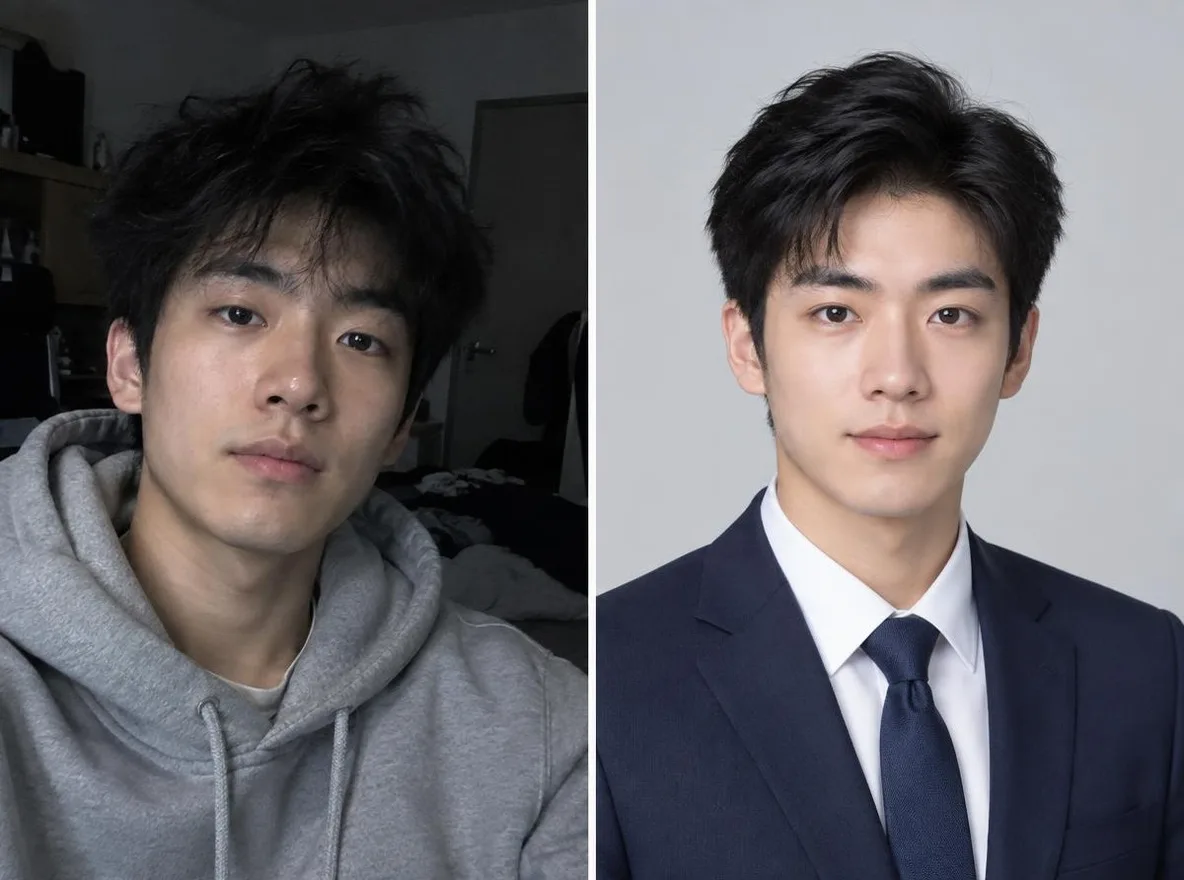
To turn a selfie into a professional headshot or ID-style photo, take an unfiltered, front-facing selfie in soft daylight, upload it to Pickshot's AI profile photo app, and pick the option that matches your use: Business, ID photo, Casual or Creator. One important limit: AI-generated or AI-edited photos are generally not accepted for passports, national ID cards, driver's licenses, visas or exam registrations, so get official photos taken at a studio or photo booth without any editing.
What does the AI profile photo app actually change?
The app takes one uploaded photo and redraws the outfit, background and lighting for a specific purpose while keeping your facial features. You don't need to write a prompt.
Here is what each option aims for:
- Business: a studio-style headshot with a navy suit, light grey seamless background and soft studio lighting.
- ID photo: front-facing, neat hair, dark suit jacket, plain white background and even lighting.
- Casual: smart-casual clothing, a soft beige background and natural window light.
- Creator: a trendier outfit on a colorful soft gradient background.
The output is a 3:4 portrait at roughly one megapixel (for example 864x1152 px). The app requires a login and costs 2 credits per run. A free account comes with 50 credits on sign-up and a 10-credit daily bonus, which is enough to try several selfies before deciding. Paid plans are listed on the pricing page; paid checkout is not open yet, and there is a waitlist.
What makes a good source selfie?
AI does its best work when it has to invent as little as possible. The more detail is missing or distorted in your selfie, the more the model fills in, and the less the result looks like you. Spend two minutes on the source photo and you will save many retries.
Light: soft, even and from the front
- Face a window during the day. Daylight from the front lights your whole face evenly.
- Avoid overhead ceiling lights, backlight from a window behind you, and lamps on one side only. They create shadows that change the apparent shape of your eyes, nose and jaw.
- If you have to shoot at night, place two lamps on the left and right, or bounce light off a white wall.
Angle and distance: eye level, straight on, not too close
- Hold the camera at eye level and look straight into the lens. Shooting from below enlarges the chin and nose; shooting from above shrinks the jaw.
- Phone wide-angle lenses distort faces at arm's length, making noses bigger and faces wider. Use a timer or a tripod, step back about one meter (three feet), and use 2x zoom.
- Include your shoulders. The app needs them to fit a suit jacket or shirt naturally.
Resolution and filters: use the original file
- Upload the original image from your camera app. Photos forwarded through WhatsApp, LINE, KakaoTalk or WeChat, and screenshots, are compressed and lose fine detail.
- Turn off beauty filters, face slimming, skin smoothing and eye enlargement. If an already-filtered photo gets retouched again, the result often stops looking like you.
- If you wear glasses, check for lens glare. Keep bangs off your eyebrows and eyes.
- A photo with only you in it and a plain background works most reliably.
How do I make an AI ID-style photo, step by step?
- Sign in to Pickshot and open the AI profile photo app. It works in a mobile browser too; there is no separate app to install.
- Upload one selfie that meets the checklist above.
- Choose the option for your purpose: Business, ID photo, Casual or Creator.
- Press generate. Each run uses 2 credits.
- Compare the result side by side with your original. Check your eye shape, face shape, moles and hairline. If it doesn't feel like you, retake the selfie with better light or a straighter angle rather than regenerating the same photo over and over.
- Save the result you like and crop it to the size you need. The 3:4 ratio fits a Korean 3x4 cm or Japanese 40x30 mm resume photo directly; for other ratios, such as 35x45 mm or a square avatar, adjust the margins when cropping.
If you plan to print, check the resolution too. At 300 dpi, a 3x4 cm photo needs about 354x472 px, so an 864x1152 px result leaves plenty of room.
Which option should I use for LinkedIn, job applications or avatars?
| Use | Recommended option | Notes |
|---|---|---|
| Private-sector job applications, LinkedIn | Business | Use only results that clearly look like you |
| Internal staff directory, school or club rosters | ID photo or Casual | Only where the organization accepts it |
| WhatsApp, LINE, KakaoTalk or WeChat avatar | Casual | Crop the 3:4 result to a square |
| Instagram, YouTube, Xiaohongshu | Creator | Follow each platform's AI labeling rules |
Xiaohongshu (RED) favors 3:4 vertical images, so the output can be posted as is. A practical note for job seekers abroad: in the US and UK, resumes usually don't include a photo at all, while in Japan, Korea and China a photo on the resume is still common. LinkedIn, on the other hand, displays a profile photo everywhere, which is where the Business option is most useful.
What photo sizes are used in Korea, Japan, China and the US?
The table below lists common sizes. Resume photo sizes are conventions rather than legal standards, so the employer's instructions always win.
| Country and use | Photo size | AI photo acceptable? |
|---|---|---|
| Korea, resume | 3x4 cm (convention) | Usually, check the employer's rules |
| Korea, passport | 3.5x4.5 cm, head 3.2-3.6 cm, taken within 6 months, white background | No |
| Korea, resident ID and driver's license | 3.5x4.5 cm (passport format) | Generally no |
| Japan, resume (rirekisho) | Usually 40x30 mm (height x width); MHLW template: 36-40 mm x 24-30 mm | Check the employer's rules |
| Japan, passport | 45x35 mm (height x width), head 34 +/- 2 mm | No |
| Japan, driver's license | 30x24 mm (height x width), within 6 months | Generally no |
| China, resume and forms | 1-inch 25x35 mm, 2-inch 35x49 mm (35x45 and 35x53 mm variants exist) | Depends on use |
| China, passport | 33x48 mm, head height 28-33 mm, within 6 months | No |
| US, passport | 2x2 inches (51x51 mm) | No |
| Visas, language and certification exams | Varies by authority | Generally no |
Why can't AI photos be used for passports and IDs?
A passport or ID photo isn't there to look good. It's biometric data used to confirm who you are. Facial recognition gates at immigration and officers comparing your face to the document both depend on a photo that shows your current face without alteration.
Official rules in each country point the same way:
- United States: the State Department's passport photo guidance says, "Do not change your photo using computer software, phone apps or filters, or artificial intelligence."
- South Korea: Ministry of Foreign Affairs guidance states that copied photos and photos edited with Photoshop or similar programs cannot be used.
- Japan: the Ministry of Foreign Affairs says photos that change your appearance through edits such as enlarging the eyes, slimming the jaw, skin whitening, or removing moles and wrinkles cannot be used. Edited photos in online applications are rejected and must be replaced.
- China: the National Immigration Administration tells applicants not to use photo editing, beauty modes, filters or face slimming for exit-entry documents, and Chinese consulates state that photos must not be modified and composite photos are not allowed.
An AI profile photo works by redrawing your clothes and background and gently retouching your skin, starting from your original. However natural the result looks, it is by definition an altered photo under these rules. A rejected photo means retaking it and resubmitting, and an ID that doesn't match your real face can cause problems at a border. Pickshot itself does not guarantee that AI ID photos will be accepted for passports or official IDs. Treat visa applications and exam registrations (language tests, licensing exams, university entrance exams) the same way, since they also use your photo to verify identity, and always check the issuing authority's current requirements.
Is it okay to use an AI headshot for a job application?
Where you choose the photo yourself, such as a private-sector resume or a LinkedIn profile, many people use AI headshots. A few habits keep it on the safe side:
- Use only results that look like you in person. If an interviewer can't recognize you from your photo, it can hurt trust more than a plain snapshot would.
- If an employer asks for a recent photo or an unedited photo, follow that instruction.
- Some application systems don't accept photos at all, or check them during screening. Read the application guidelines first.
How do I protect my privacy, and can I use someone else's photo?
The most important rule is simple: only use photos of yourself. Uploading a friend's, family member's or celebrity's photo without consent can violate their portrait and privacy rights, and Pickshot prohibits impersonating real people. Uploaded photos are safety-checked before anything is generated.
A few more habits worth keeping:
- If location data in your original file concerns you, strip it before sharing the photo anywhere.
- Never upload a photo of your ID card or a screenshot showing ID numbers.
- Sharing to Pickshot's public Explore feed is opt-in. You don't have to share a profile photo that shows your face.
- When posting on social media, follow each platform's rules for labeling AI-generated images.
Which other apps pair well with this?
- Hairstyle try-on: preview a hush cut, a bob with see-through bangs, long straight hair, a volume perm, a men's short cut or ash blonde before your next salon visit or photo session.
- Traditional outfits: see yourself in hanbok, kimono, qipao, hanfu or a school uniform.
- If you'd rather write your own prompts, read our guide to writing prompts in your native language.
Sources
- U.S. Department of State, U.S. Passport Photos: https://travel.state.gov/content/travel/en/passports/how-apply/photos.html
- Ministry of Foreign Affairs of Korea, Consulate General in Toronto, passport photo standards: https://www.mofa.go.kr/ca-toronto-ko/brd/m_5389/view.do?seq=1344544
- Ministry of Foreign Affairs of Japan, passport photo standards: https://www.mofa.go.jp/mofaj/toko/passport/ic_photo.html
- Ministry of Foreign Affairs of Japan, notes on face photos for online applications: https://www.mofa.go.jp/mofaj/toko/passport/page24_002222.html
- Ministry of Health, Labour and Welfare of Japan, resume template: https://www.mhlw.go.jp/content/11601000/000769679.pdf
- Tokyo Metropolitan Police Department, driver's license photo guidance: https://www.keishicho.metro.tokyo.lg.jp/menkyo/koshin/koshin/koshin02_2.html
- National Immigration Administration of China, photo submission guide for exit-entry documents: https://s.nia.gov.cn/mps/mbbszy/qcwbzpzy/202405/t20240528_1001.html
- Consulate General of China in Chicago, passport photo requirements: https://chicago.china-consulate.gov.cn/lsfw/zj/hzlxz/202605/t20260501_11903971.htm
Ready to try it with one selfie?
Once you have one front-facing selfie taken by a window, you're ready. Open the AI profile photo app, pick the option for your purpose, and create a headshot for your resume, LinkedIn or messenger avatar. For your passport and ID, keep using an unedited photo from a studio or photo booth.
Questions
Can I use an AI-generated ID photo for my passport?
No. Passport authorities require a recent, unedited photo. The US State Department says not to change your photo using software, apps, filters or artificial intelligence, and Korea, Japan and China have similar rules against retouched or composite photos.
Is it okay to put an AI headshot on my resume or LinkedIn?
For private-sector applications and professional profiles, you choose the photo, and many people use AI headshots. Make sure it still looks like you in person, and follow any employer instruction that asks for a recent or unedited photo.
What size is a Japanese or Korean resume photo?
Japanese resumes usually use a 40x30 mm photo; the Ministry of Health, Labour and Welfare template specifies 36-40 mm high and 24-30 mm wide. Korean resumes conventionally use a 3x4 cm photo.
Is Pickshot's AI profile photo app free?
It requires a free account and costs 2 credits per run. Free accounts get 50 credits on sign-up plus a 10-credit daily bonus, so you can try it without paying.
What kind of selfie gives the best result?
An original, unfiltered photo taken facing a window in daylight, with the camera at eye level and about a meter away using 2x zoom. Avoid screenshots and images compressed by messaging apps.
Can I make a headshot from a friend's or celebrity's photo?
No. Only upload photos of yourself. Pickshot prohibits impersonating real people, and you should never upload someone else's face without their consent.
This is a preview: browse every model and setting and try the queue. Sign up and get 50 credits.
Tour the studio